What is a Google AdSense PIN? How can I ensure I receive the PIN code successfully to complete payment address verification?
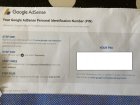
When your Google AdSense earnings reach the verification threshold, Google will mail you a Personal Identifier (PIN) to verify your payment address. The PIN is a 6-digit code generated by Google when your AdSense account balance reaches the minimum required for verification.

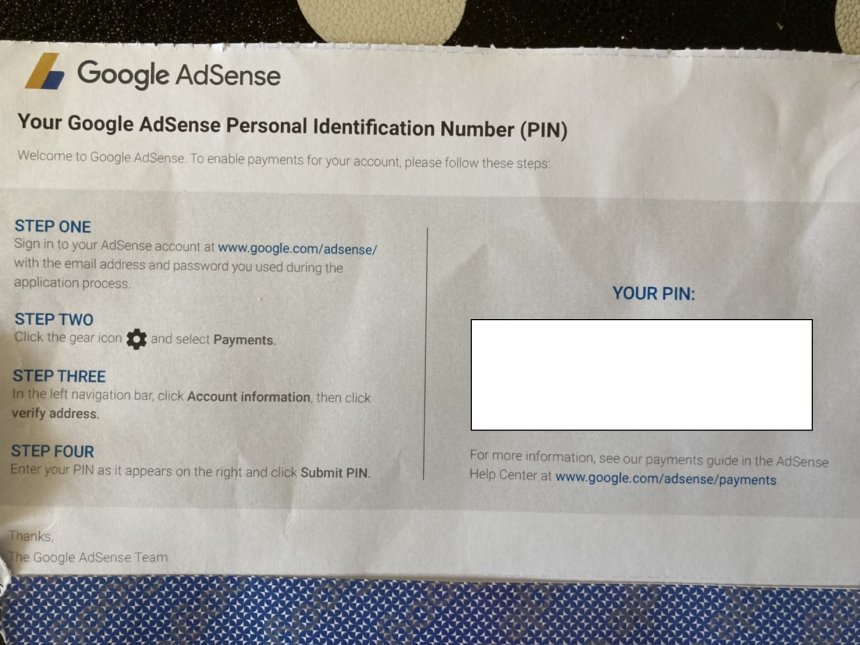
When your Google AdSense earnings reach the verification threshold, Google will mail you a Personal Identifier (PIN) to verify your payment address. The PIN is a 6-digit code generated by Google when your AdSense account balance reaches the minimum required for verification. If you fail to enter the correct PIN to complete payment address verification, Google will stop displaying ads on your website.
Google AdSense Personal Identification Code (PIN) and Payment Address Verification
Google AdSense offers two types of accounts: personal accounts and business accounts.
There is no difference between personal accounts and corporate accounts in terms of service or payment structure. Funds from personal accounts will be paid to the account holder's payee, while funds from corporate accounts will be paid to the company.
When registering and activating your account, you will need to enter a valid payment address in AdSense, and it is best to enter the detailed address information in your local language.
A valid mail receiving address is an address that can receive regular emails. Below is an example of the standard address format recommended by Google: Address 1: City name, district/residential complex name, street name, house number
Address 2 (if applicable): Building name, floor number, unit number
Postal Code: Postal Code
To protect your account security, Google requires you to verify your payment address before sending any payments. Specifically, once your AdSense account balance reaches the minimum threshold for verification (Minimum Threshold of Earnings), Google will mail a Personal Identification Number (PIN) to the address you provide. Only after you receive the PIN and complete address verification can you begin receiving payments according to Google's payment process.
Each payment account in your AdSense account (such as a YouTube payment account) has its own minimum limit. The minimum limit varies depending on the currency set for the account. For example, the minimum income verification limit and the minimum payment limit for a USD-denominated AdSense account are $10 and $100, respectively.
When the verification threshold is reached, Google will send you an email notification, and you will also see a related reminder in the AdSense backend.
For AdSense publishers in Vietnam and China, the PIN (Personal Identification Number) is sent from Singapore and typically arrives within 2-4 weeks, depending on your country's local postal service. If you do not use the PIN to verify your payment address within 4 months of receiving the first PIN from Google, Google will stop advertising on your website.
If you haven't received it, you can apply for a new PIN code three weeks after Google sent you the previous one. Before requesting a new PIN code, please ensure that the payment address in your AdSense account is accurate. If the address information is incorrect, you will need to change the payment address information in your account to ensure that you can receive emails normally.
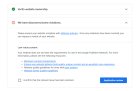
Additionally, if Google asks you to verify your identity during address verification, Google will not send you a PIN code until you successfully complete the identity verification process.
Google AdSense PIN code receiving and payment address verification process
As mentioned above, once your AdSense earnings reach the minimum threshold required for verification, Google will send a unique 6-digit Personal Identification Number (PIN) to the address you provide via international standard mail. Because the PIN is sent via international regular mail, Google does not provide a tracking number for the PIN; therefore, you must ensure that the address you provide can receive standard mail.
You have four months from the date your PIN is generated to complete address verification. If you fail to verify your payment address after four months, Google will stop displaying ads on your website.
If you haven't received your PIN code 3 weeks after it was sent, you can request a replacement PIN code. Log in to your AdSense account, click "Receive Payments" - "Verification Check" in the left navigation bar, and then click "Resend PIN Code" on the address verification page.
Click "Confirm" again in the pop-up window to resend the PIN code.
Google will then resend a PIN code to your payment address. The replacement PIN code is exactly the same as the original; you can enter any PIN code you receive, regardless of the delivery order.
I didn't receive the PIN code email Google sent the first time, so I searched online for other Google AdSense website owners' experiences and suggestions. I added my contact phone number to the second line of the address in the payment information settings in the AdSense backend.
Then I applied for a new PIN code.
Exactly two weeks after the second Google AdSense PIN code email was sent, I finally managed to contact them successfully using the phone number provided in the address information and received it.
After receiving the PIN code in the email, log in to your AdSense account, then enter the PIN code Google mailed to you on the address verification page, and click submit. Note that if you enter the PIN code incorrectly three times, the address verification will fail, and your account will be suspended from displaying ads.
Once your AdSense account payment address is verified, Google will pay you once your account balance reaches the minimum payment limit.
The above is an introduction to what a Google AdSense Personal Identifier (PIN) is and how to receive a PIN code to complete the payment address verification process.
Share
What's Your Reaction?
 Like
0
Like
0
 Dislike
0
Dislike
0
 Love
0
Love
0
 Funny
0
Funny
0
 Angry
0
Angry
0
 Sad
0
Sad
0
 Wow
0
Wow
0