

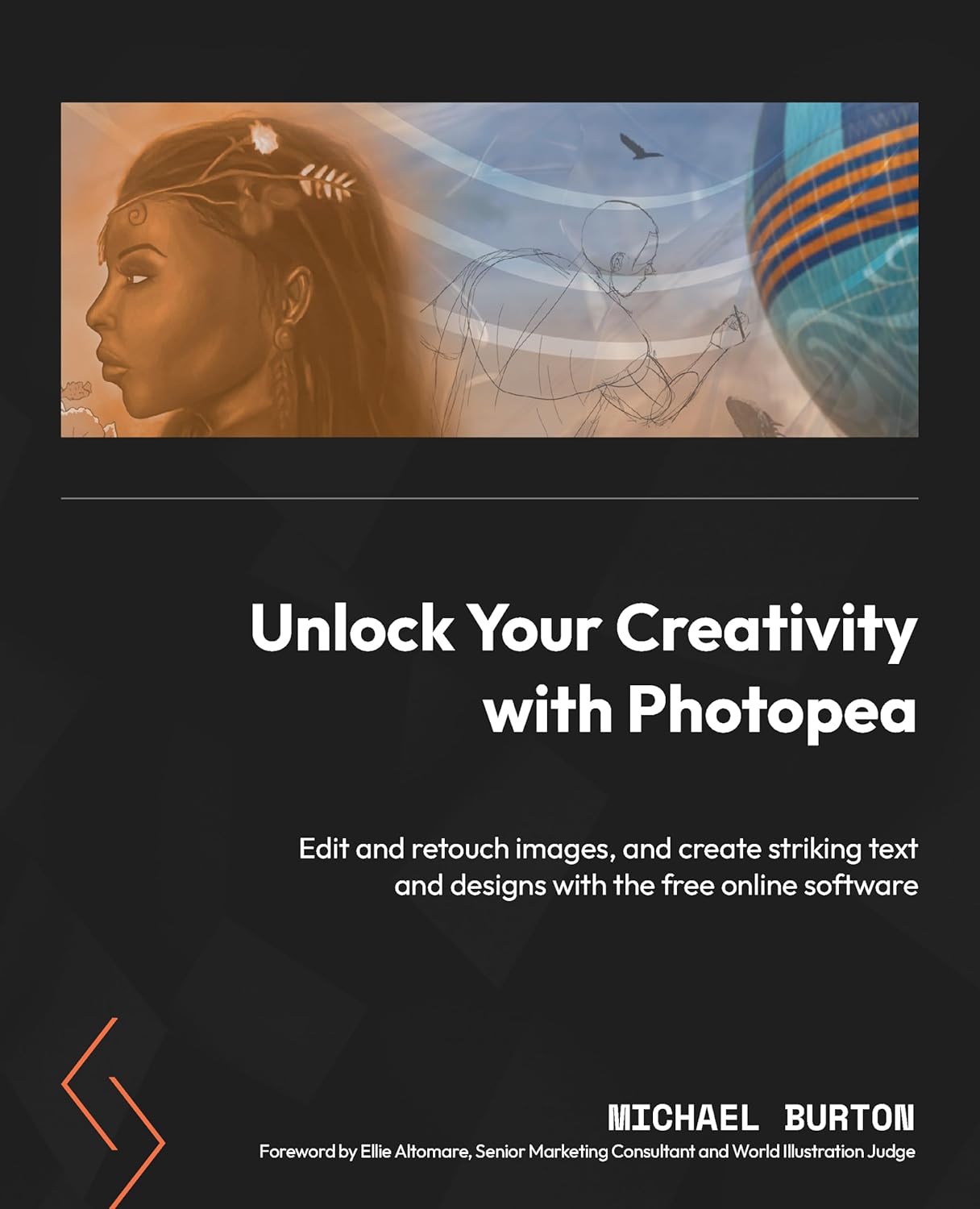


Tap into the power of Photopea and learn photo editing, digital painting, and how to design graphics for social media, marketing, and merchandise with this self-paced manual written by multidisciplinary visual artist, Michael Burton
Key FeaturesGain foundational skills in photo editing, design, and digital paintingDiscover tools for selections, color adjustments, text application, and content creationExplore the latest updates and plug-ins for more control over image enhancementPurchase of the print or Kindle book includes a free PDF eBookBook Description
Photopea is a comprehensive image and photo editing design tool that provides essential features and capabilities comparable to Adobe Photoshop. This book covers the latest version of Photopea, featuring step-by-step instructions for image editing, improving and enhancing designs with text and effects, and creating eye-catching projects for print and the web.
The first part of this book will teach you how to navigate the workspace, use the best tools for specific tasks and projects, and make perfect selections. You’ll also discover how to remove backgrounds, merge and/or add objects, and adjust colors to create impressive images. Later, you’ll explore layers and compositing techniques, and get hands on with retouching images like a pro. The book will demonstrate how to create collages and use brushes, color wheels, and swatches for drawing and painting. You’ll also learn how to apply impressive text to images to create posters, flyers, and logos.
By the end of this book, you’ll have learned how to retouch, paint, enhance, and manipulate images; how to use templates provided by Photopea; and finally, how to apply your skills to projects.
What you will learnUnderstand how to use masks, layer adjustments, and work non-destructively with your imagesUse photo retouching techniques to enhance your images, revive old photos, and apply effectsUse brushes effectively and learn how to create custom brushes for specific tasks and effectsApply different selections for removing backgrounds and objects from photosUtilize the principles of color theory to craft visually stunning compositionsDraw stunning vector and bitmap formats for coloring, rendering, and finished illustrationsWho this book is for
This book is for photographers, illustrators, graphic designers, hobbyists, and students in need of alternative graphic design software suitable for digital imaging and more. Beginners with no prior knowledge of photo editing will also benefit from this book, as it will help them learn fundamental editing skills while they explore Photopea’s functionality.
Table of ContentsTaking Your Design and Editing to the Next Level with Photopea Creating and Working with Image Editing Documents in PhotopeaNavigating and Utilizing the WorkspaceLayer Management: Creating, Organizing, and Applying Advanced FeaturesUnderstanding Selection FundamentalsColor Theory and ApplicationUsing and Creating BrushesPhoto Retouching TechniquesExploring Advanced Image Compositing TechniquesText Fundamentals and Styling in PhotopeaPre-Designed Templates, Extra Effects, and Features OverviewAdvanced Color TechniquesBonus: How to Draw and Paint a Figure and CharacterBonus: How to Create a LogoTips, Tricks, and Best Practices
From the brand

See more at our store:

Packt is a leading publisher of technical learning content with the ability to publish books on emerging tech faster than any other.
Our mission is to increase the shared value of deep tech knowledge by helping tech pros put software to work.
We help the most interesting minds and ground-breaking creators on the planet distill and share the working knowledge of their peers.
ASIN : B0D2R73KPJ
Publisher : Packt Publishing
Accessibility : Learn more
Publication date : July 5, 2024
Edition : 1st
Language : English
File size : 111.5 MB
Screen Reader : Supported
Enhanced typesetting : Enabled
X-Ray : Not Enabled
Word Wise : Not Enabled
Print length : 704 pages
ISBN-13 : 978-1801819442
Page Flip : Enabled
Best Sellers Rank: #2,894,163 in Kindle Store (See Top 100 in Kindle Store) #583 in Design & Graphics Software Books #1,866 in Digital Media #1,925 in Computer Graphic Design
Customer Reviews: 3.6 3.6 out of 5 stars (7) var dpAcrHasRegisteredArcLinkClickAction; P.when(‘A’, ‘ready’).execute(function(A) { if (dpAcrHasRegisteredArcLinkClickAction !== true) { dpAcrHasRegisteredArcLinkClickAction = true; A.declarative( ‘acrLink-click-metrics’, ‘click’, { “allowLinkDefault”: true }, function (event) { if (window.ue) { ue.count(“acrLinkClickCount”, (ue.count(“acrLinkClickCount”) || 0) + 1); } } ); } }); P.when(‘A’, ‘cf’).execute(function(A) { A.declarative(‘acrStarsLink-click-metrics’, ‘click’, { “allowLinkDefault” : true }, function(event){ if(window.ue) { ue.count(“acrStarsLinkWithPopoverClickCount”, (ue.count(“acrStarsLinkWithPopoverClickCount”) || 0) + 1); } }); });

Rockwell –
The physical version vs the digital e-book, and free download resource files accompanied the book!
This is a great instructional book on learning Photopea, and anyone interested in learning photo editing, applying effects, creating cutting edge text design, and some facets of graphic design!You can download the original photos and Photopea exercise documents using the download link located in the Preface section under: “To get the most out this book” found on page 16 (XV) of the eBook, and on Preface page (XV) of the physical book.Chapters 4-8 include the photos. Chapters 9-15 include the photos and Photopea exercise files were very helpful for learning.Replying to the reviewers that said the book wasn’t helpful, they didn’t get far enough into the book to get to the official instructions:The first few chapters covered things like installing the software, the essentials for beginners that may not have had a foundation on the fundamentals of Color Theory, hardware basics on Printers, Monitors, Opening and Saving Documents, using Guides, Rulers, etc. Chapter 3 isn’t a step by step but explains what a lot of the tools can do.Chapter 4 goes into light instruction, but picks up a lot when you get to chapter 5 and beyond. You can tell the author really picks up the pace and detailed instructions going forward.NOTE: The e-book version is of better quality than the physical book. The images and text are very clear and detailed, and you also have the ability to zoom in and out to see the steps clearly.NOTE 2: Due to a lot of examples, and detailed steps inside of this thick 478 page book; I highly recommend those that purchased the physical copy, to download the free e-book version as well.
Busy Bee –
Fantasic manual to Photopea
I’m working my way through reading this book. So far so good. Amazon delivered the book with the front cover damaged – I asked for a replacement and received it very quickly. Thanks for that! Please take care sending EVERY type of book out to customers.
nicole –
Awesome Guide For All
I was blown away by the content of this book. Very detailed , well structured. This book seems to have it all within its pages . If you’re looking for a true guide this is the book for you look no other place . I just can’t believe a book like this is on the market most people gatekeepers but this author wants us to win and doesn’t mind sharing his ideas and teachings . Having a hard copy is best so I can just flip through the book and highlight what i need to .
Joyy Norris –
Ideal Photo Editing Guide for All Skill Levels
Unlock Your Creativity with Photopea, is an incredibly detailed and thoughtful editing design guide that helps users of all levels navigate the digital illustration process using Photopia software.Written by multidisciplinary visual artist Michael Burton, the information shared in this book is approachable and digestible and written in a way that only an adept professional creative can communicate. If you are looking for a new digital editing program and advice on creating work to be proud of, this book is for you.
Montsho Shelby –
It had everything
It’s hard enough to navigate photoshop or any other digital art media but this book touches on every aspect. It had beautiful choices in art pieces and it really made sure you knew what to do by the end of each chapter. If you wanna get better in your digital art this is the book to try!
Cliente de Kindle –
Es indignante que dado su precio tan elevado, su magnífica redacción y sus extraordinarias representaciones gráficas, LA CALIDAD DE PAPEL ESCOGIDO PARA IMPRIMIRLO ES PURA BASURA:-AL SUBRAYAR UN PÁRRAFO CON UN ROTULADOR, LA LÍNEA ATRAVIESA LA PÁGINA Y ESTROPEA SU REVERSO!- SI SE MARCA UN PÁRRAFO CON UN ROTULADOR FLUORESCENTE, EL COLOR ATRAVIESA LA PÁGINA Y MANCHA SU REVERSO!ES EL COLMO DE LA INCOMPETENCIA. ¿QUIÉN HA SIDO EL INÚTIL QUE HA ESCOGIDO EL PAPEL PARA DESTROZAR LA UTILIDAD DE ESTE MAGNÍFICO LIBRO?
Dr. Klaus E. Heck –
I have now read 20% of the book. I liked the reading sample. The book is also written in plain English. So I bought it as a Kindle version. But then: as soon as it came to learning, the author forgets that he wants to teach us Photopea and not show us what he does with it. So I was asked to open a mountain photo. “What kind of mountain photo?” I thought. So I downloaded one from Google. But then I remembered that in the introduction he wrote something about material that could be downloaded. And sure enough, I found the first photo. It was in chapter 4, so I downloaded it. I was supposed to “rasterize” this picture. And I did. No explanation as to why the photo wasn’t already rasterized anyway. And then: I could have taken any other mountain photo. Because he didn’t manipulate anything else in the picture. I was then told to load a brown block, which I did. In the book, the brown block was then a frame if it was arranged correctly. In reality, however, the size of the brown block was much smaller than the mountain photo. So I enlarged the block and finally had my frame. It goes on like this the whole time. In the next examples, it doesn’t even ask me to open any sample files. I do learn how to do this when masking. But in the first example, not a word about how I can then use this masked file in any way. Nope! It’s no fun like that. I’m still undecided about returning the book. But unfortunately it’s the only Kindle book out there. So I’m still hesitating.