



Photoshop CC is an outstanding image editor, but it can be pretty overwhelming. This book makes learning Photoshop as easy as possible by explaining the hows and whys in a friendly, conversational style. You’ll unlock Photoshop’s secrets, new goodies, and time-saving features, with expert tips and practical editing advice you can use every day.
The important stuff you need to know:
Learn your way around. Tour Photoshop’s workspace and learn how to customize it. Unleash the magic. Use selections, layers, masks, and smart objects to safely edit images; automate common chores with actions. Perfect your photos. Learn to crop, resize, color-correct, retouch, combine, and prepare photos for print or online use. Master color. Drain, change, and add color, and even create digital makeup, partial-color effects, and duotones. Be artistic. Use filters effectively, create illustrations, paintings, artistic typography, animations, and videos. Go 3D. Create and edit 3D objects and send them off to a 3D-printing service from inside Photoshop. Export web graphics. Use Generator to instantly export and resize images―just by using layer names.
From the Publisher
What’s New in Photoshop CC 2014

New blur filters
This version of Photoshop CC sports two additions to the Blur Gallery family of filters that let you simulate motion in a photo that doesn’t have any (or that doesn’t have enough).

Typekit access, font searches, and instant font previews
In this version of the program, you can get to hundreds of fonts right from Photoshop’s font family menu and—once you install them (which is incredibly easy)—you can use them in any program on your machine that sports a font menu.
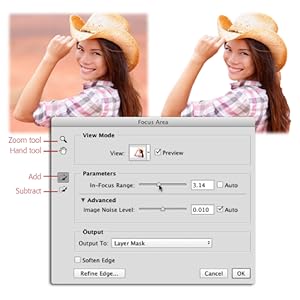
Select in-focus areas with Focus Area
This new command summons a dialog box that automatically selects the in-focus parts of an image. It does a great job if the photo has a strong focal point and a blurry background, and the dialog box includes a couple of sliders and brushes that you can use to fine-tune the selection. You can also send the selection straight over to the Refine Edge dialog box for more tweaking.
Publisher : O’Reilly Media
Publication date : September 30, 2014
Edition : 2nd
Language : English
Print length : 989 pages
ISBN-10 : 1491947195
ISBN-13 : 978-1491947197
Item Weight : 4.05 pounds
Dimensions : 7 x 1.75 x 9.5 inches
Best Sellers Rank: #1,382,039 in Books (See Top 100 in Books) #112 in Adobe Photoshop #239 in Photography (Books) #283 in Design & Graphics Software Books
Customer Reviews: 4.3 4.3 out of 5 stars (96) var dpAcrHasRegisteredArcLinkClickAction; P.when(‘A’, ‘ready’).execute(function(A) { if (dpAcrHasRegisteredArcLinkClickAction !== true) { dpAcrHasRegisteredArcLinkClickAction = true; A.declarative( ‘acrLink-click-metrics’, ‘click’, { “allowLinkDefault”: true }, function (event) { if (window.ue) { ue.count(“acrLinkClickCount”, (ue.count(“acrLinkClickCount”) || 0) + 1); } } ); } }); P.when(‘A’, ‘cf’).execute(function(A) { A.declarative(‘acrStarsLink-click-metrics’, ‘click’, { “allowLinkDefault” : true }, function(event){ if(window.ue) { ue.count(“acrStarsLinkWithPopoverClickCount”, (ue.count(“acrStarsLinkWithPopoverClickCount”) || 0) + 1); } }); });

John Stevenson –
a great (and truly biblical) Photoshop volume
The word “bible” appears as one of the very first words in this 927 page book (it’s at the top of the front cover). And so it is. But in only one sense. The material covered is indeed biblical in scope: Genesis through Revelation in fact. But the content itself has not one hint of biblical style.I’m almost fully a self-taught Photoshop addict. But bought this book because I’d recently watched some of the author’s video tutorial content online and was very impressed to see things there that I’d not understood at all or not quite understood correctly. And so it is with the book too. There are all sorts of useful things – written down in just a very engaging, non-fussy and (often) humorous way – that will improve any Photoshop user’s workflow. Whether they be novice or expert, designer or photographer. This has to be the best value-for-money educational contribution to Photoshop in its Creative Cloud version that there is (and I own a couple of other books on the same topic). Plus, there are online resources to boot. Some of the work files generated as examples in the book are available from a Missing Manuals website. While some related topics and projects are referenced with links to the author’s own website.So, for example, if you’re not sure that you are making image Selections by the most efficient route, then it’ll take maybe 15 minutes to read the relevant material, with all manner of helpful Tips and Notes along the way. And there will be a file to download that allows for direct practice. And later, another 15 minutes for an appreciation of the power of Smart Objects, Actions, the Generator, and so forth, etc. – just like Bible study!I highly recommend this fine book and congratulate Ms. Snider on all aspects of her authorship. Words, images, screenshots and layout – are all very fine. It is also one of the very few Photoshop books ever which features coverage of some third-party resources (plug-ins, the Adobe Add-ons site, included). It is surely to be hoped that some mechanism can be found to keep this volume up-to-date as the incremental upgrades and updates to Photoshop appear ever more frequently in the Adobe Creative Cloud.
Chuck the Moderator –
Forget Photoshop CC without this book
Very technical but nicely laid out. I am a novice to the new Photoshop in the Adobe Cloud but this book is making my understanding much quicker and I’m almost to the level where I was the last time I worked with Photoshop (Version 7). Well written and the binding is holding up well considering I am all over the place in the book with cross referencing. Recommended and the title IS perfect!
Physioz (Sports Physio – Australia) –
Good book but not for absolute PS beginners
This is an excellent, detailed book, but as somebody said earlier, it’s not really for absolute beginners. Although familiar with Lightroom, I am a complete newbie to Photoshop and found that some of the explanations assumed that you knew the (intermediate) required steps. After a lot of searching I found out how to do things but this was not what I was looking for. I will definitely keep this book as I can see that once you have some basic familiarity with Photoshop that it will be excellent as a learning aid and aide-memoir.
Roberta Boe –
A MUST BUY!
I am beyond satisfied with this book. I am not new to Photoshop, have been using it for the past 15 years but lately felt I was not able to keep up with so many of the improvements ( and some not so good improvements). I first came in contact with Lesa Snider while watching one of her workshops on CreativeLive, and I highly recommend you to do so, I did buy the course and have gone back to it a few times. I was happy to discover that her video persona comes alive on the pages of the book too.Her personable approach on teaching and the humor she injects in it makes it a lot of fun. Photoshop is a very powerful program and sometimes can get pretty frustrating when you miss a teeny tiny bit of information.She found just the right tone in the book to make it interesting to people that already know some Photoshop so it does not get boring and you do get to master the details well. She does go over the basics without succumbing to boredom and hold your hand thru some more nifty stuff.There are more advanced books but all in all this is a solid purchased, one you will be very happy to make. My only regret was not have done it earlier!
F. Savaglio –
Missing Manual Misses the Mark
Great compilation information as one would expect in a manual. However I have this feedback: Commands are often not compatible with CC 2015, Lacks in complete “how to do” instructions by referring some steps to a later chapter not yet covered. (In an auto repair manual the entire set of instructions and diagrams are in the section you are following (i.e. Not say that to remove the spark plus go to chapter 26), Mixes short cut keystrokes into normal step by step for a task instructions without references to the toolbar menu tags for the keystrokes. The Missing CD section has no references to where the teaching exercises are in the book; instead it just provides an exercise sketch with no guidance of what you are suppose to do with it. I need a manual that builds upon each needed skill and then demonstrates the skill in a diadactic exercise.
Diane L Kaiser –
GREAT RESEARCH BOOK
Book was exactly as expected. Very helpful and informative. Great research book — Well indexed, so can easily find area of inquiry. Applicable to current versions of Photoshop CC. Received faster than expected.
Mark D. Hawthorne –
I love this book because it takes you by the hand …
They are absolutely right when they refer to it as the missing manual. I love this book because it takes you by the hand and walks you through complicated procedures step by step WITH illustrations. The authors explanations are clear and do not leave you wondering if you have done something right (or wrong). When I purchased this book I had been a Photoshop user for about 3 years. This book was like a breath of fresh air. I highly recommend it.
A Customer –
Let’s face it, there’s no one book that is going to teach you everything about Photoshop but if you’re looking for a one volume overview of just what this software is capable of, this would be an excellent choice.Clearly written, well illustrated, just the right combination of techno-geeky stuff, and artistry.On its own, it’s not going to turn you into a Photoshop ninja – you still need tons of practice – but this will definitely got you off on the right foot.
Swiss-Chris –
Für mich die perfekte Mischung von Vollständigkeit und Ausführlichkeit der einzelnen Texte. Klar und verständlich. Kein Schnickschnack, keine betont lässige Sprache oder dumme Sprüche, wie sie bei gewissen Autoren zurzeit beliebt sind. Die E-Book-Version ist fürs Nachschlagen sehr praktisch.
norman steinberg –
great
Bruno G. –
Quando una volta si acquistava un programma, nello scatolone oltre a numerosi floppy 3,5″ c’erano voluminosi manuali d’uso, esercitazioni, manuali di riferimento. Oggi non più. Ammettendo che Adobe non lascia soli i propri clienti, in quanto fornisce ottiimi aiuti in linea, video, esercitazioni e così via, un manuale di riferimento manca proprio: ecco perché il “missing manual”. Non costa poco, ma dà molto: quasi mille pagine, tutte le funzioni di un programma veramente complesso illustrate nei dettagli, esempi con immagini scaricate gratuitamente (almeno queste…). Certo non è un libro per tutti, ma chi acquista Photoshop sicuramente ha già qualche nozione e prevede di dedicare tempo all’apprendimento. Sono soddisfatto dell’acquisto, risponde alle mie aspettative: è costoso ma mi dà la possibilità di accedere alle varie funzioni di Photoshop. Avevo già acquistato un “missing manual” e posso dire che si tratta di una serie molto utile.Difetto: perché la versione KIndle? Un libro di questo tipo DEVE essere stampato! In Kindle (ottimo ne ho due che uso tantissimo…) non è assolutamente maneggevole. Consiglio quindi di affrontare la spesa maggiore e acquistare la versione stampata.
DogTog –
This is my go-to manual for ANYTHING photoshop