




From the brand



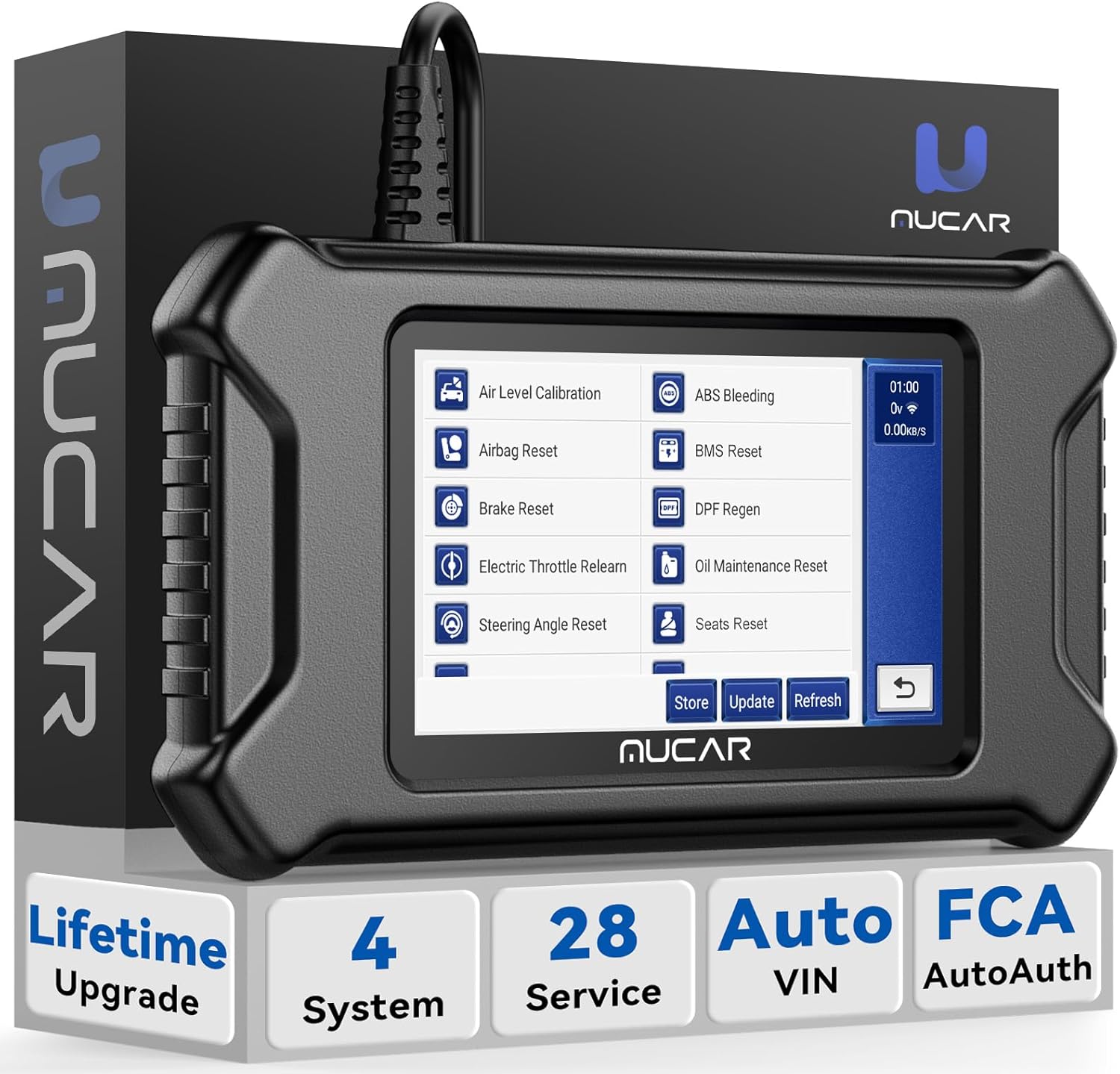
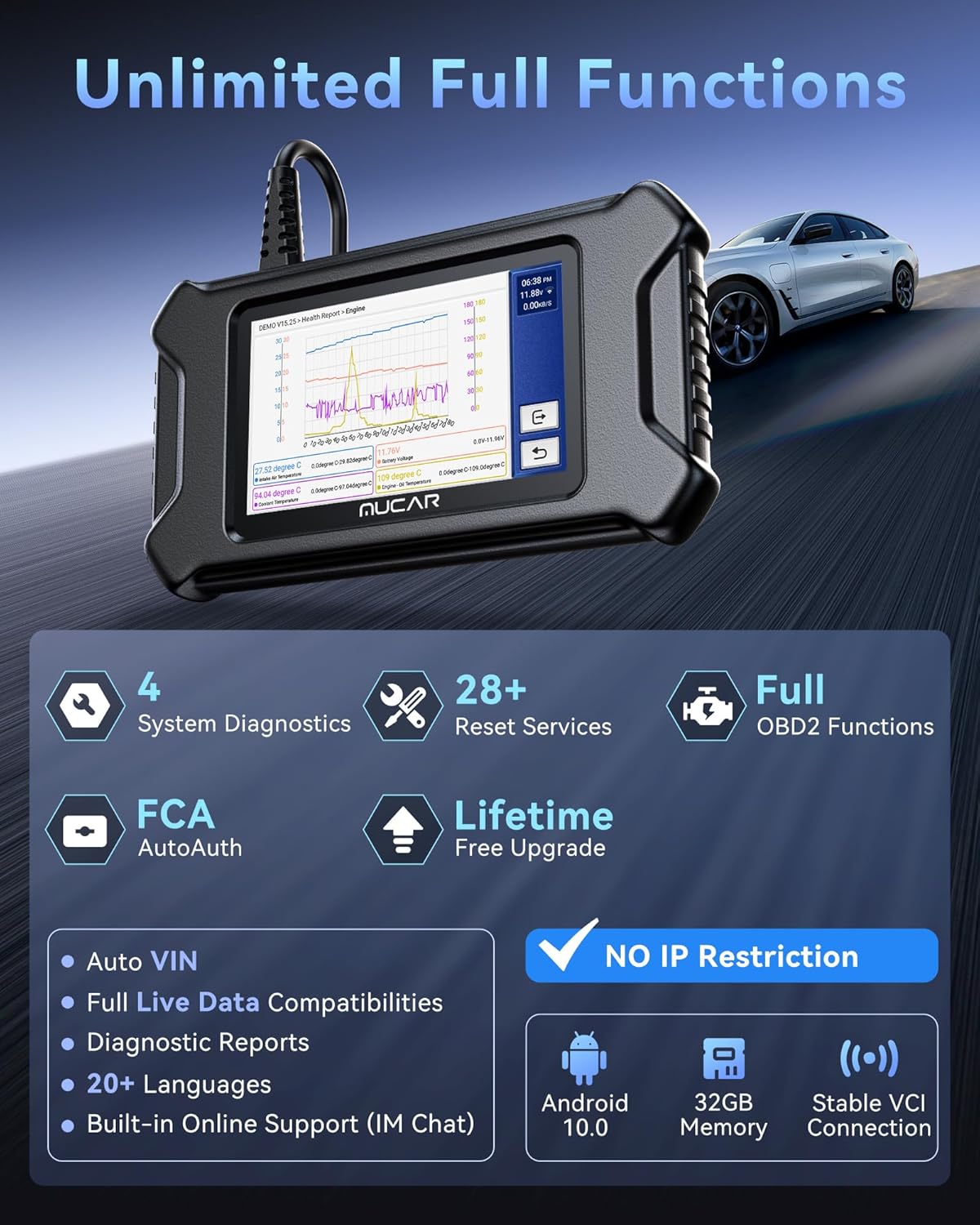
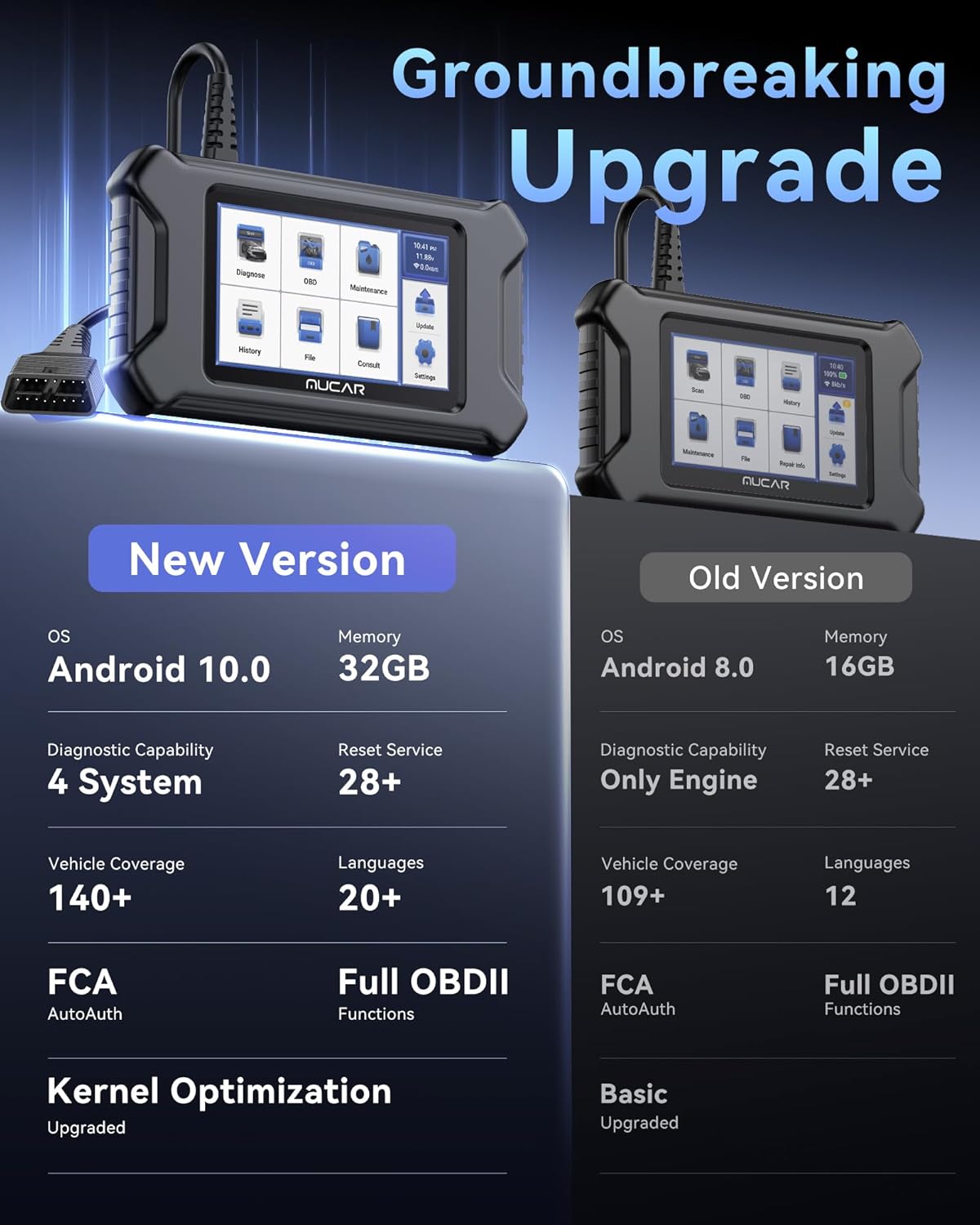
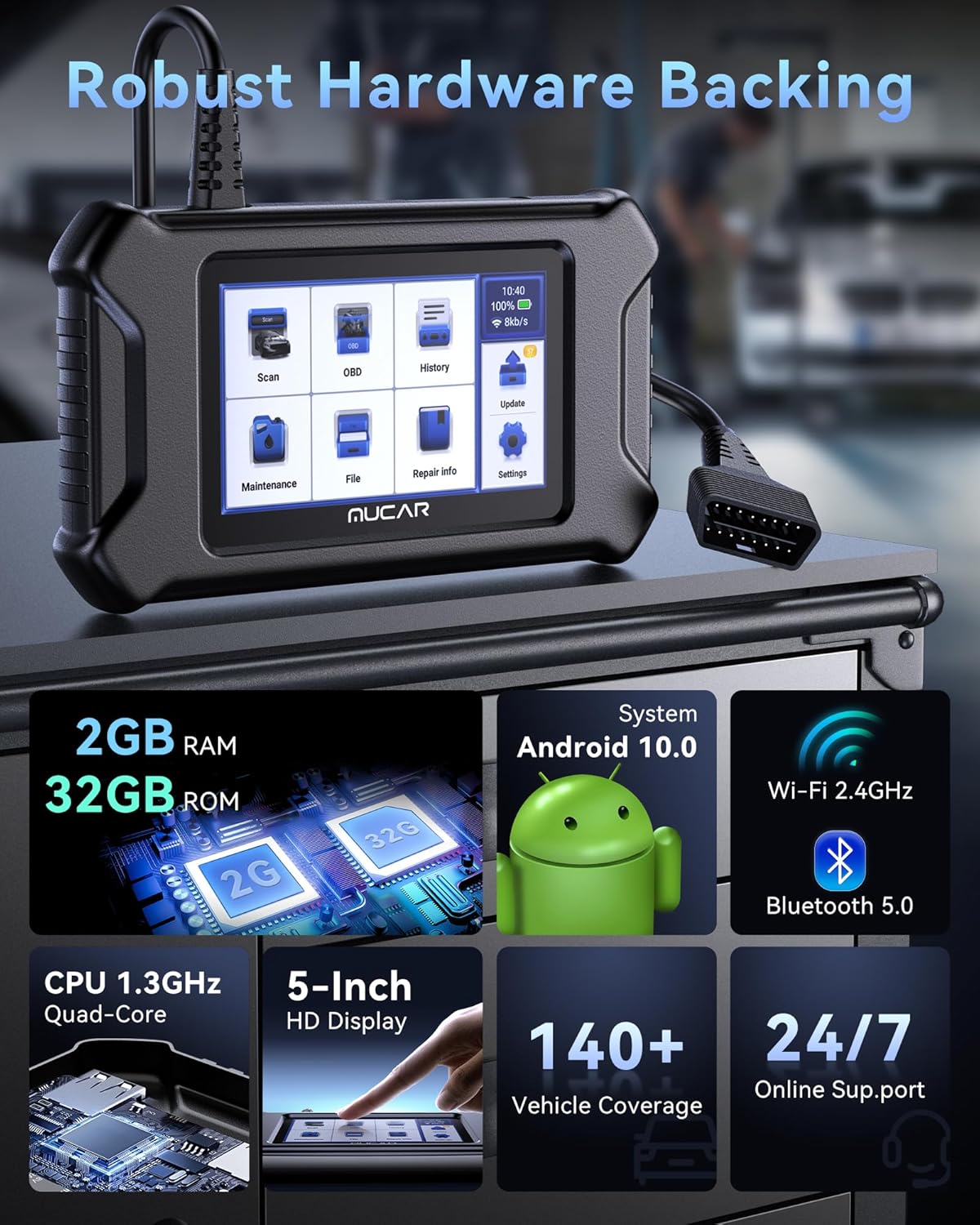
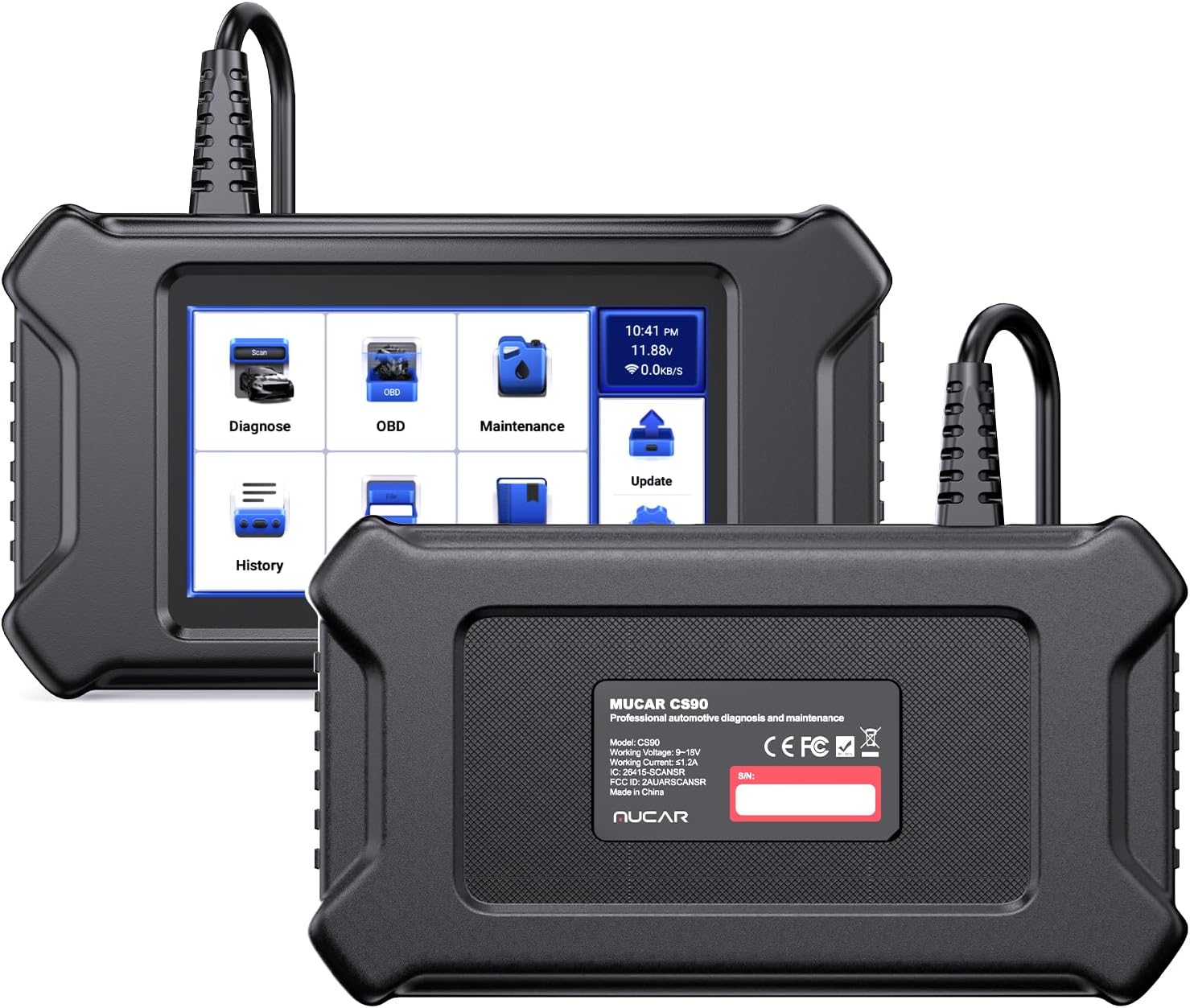
New Upgraded CS90 Scan Tool: In today’s rapidly developing automotive technology, complex electronic systems make troubleshooting more challenging. Compared to the previous version, the brand new CS90 scanner provides extra 4 system diagnosis, upgraded 28 reset service, and enhanced diagnostic report. With an upgraded 32G ROM and more user-friendly UI, you don’t have to worry about the trouble caused by insufficient storage space, quickly find car faults cause through this tool, even beginners can easily operate it.
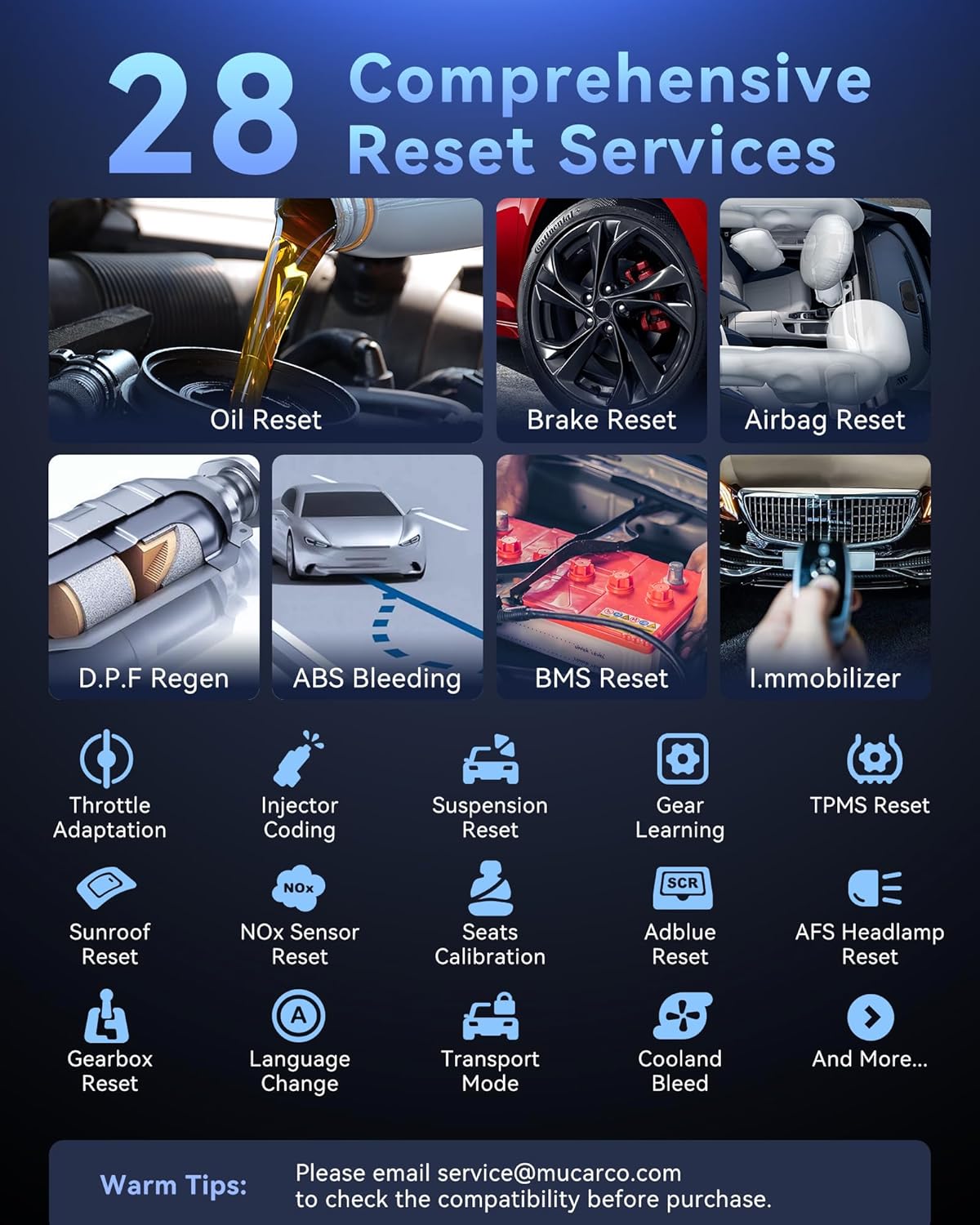
28 Reset Services: This car diagnostic tool offers 28+ reset services and upgrades, including Oil, SAS Calibration, ABS Bleeding, Injector Coding, and more. With its professional diagnostic services you can easily reset oil change indicators, fine-tune throttle response, recalibrate steering angle sensors for optimal vehicle performance and more. Warm tips: Menus may vary on vehicles’ model and year, please check the compatibility before purchase to make sure it works well on your cars.
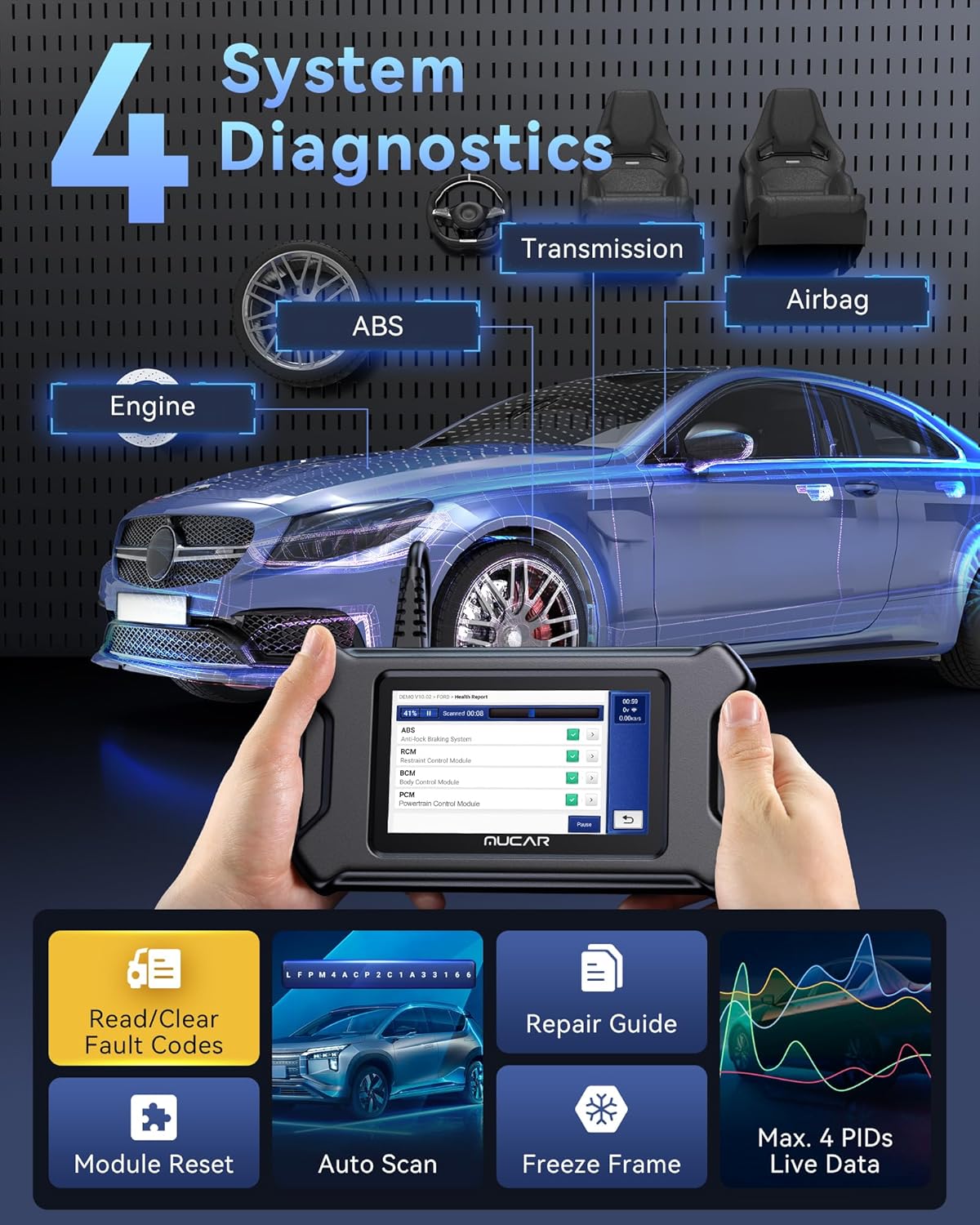
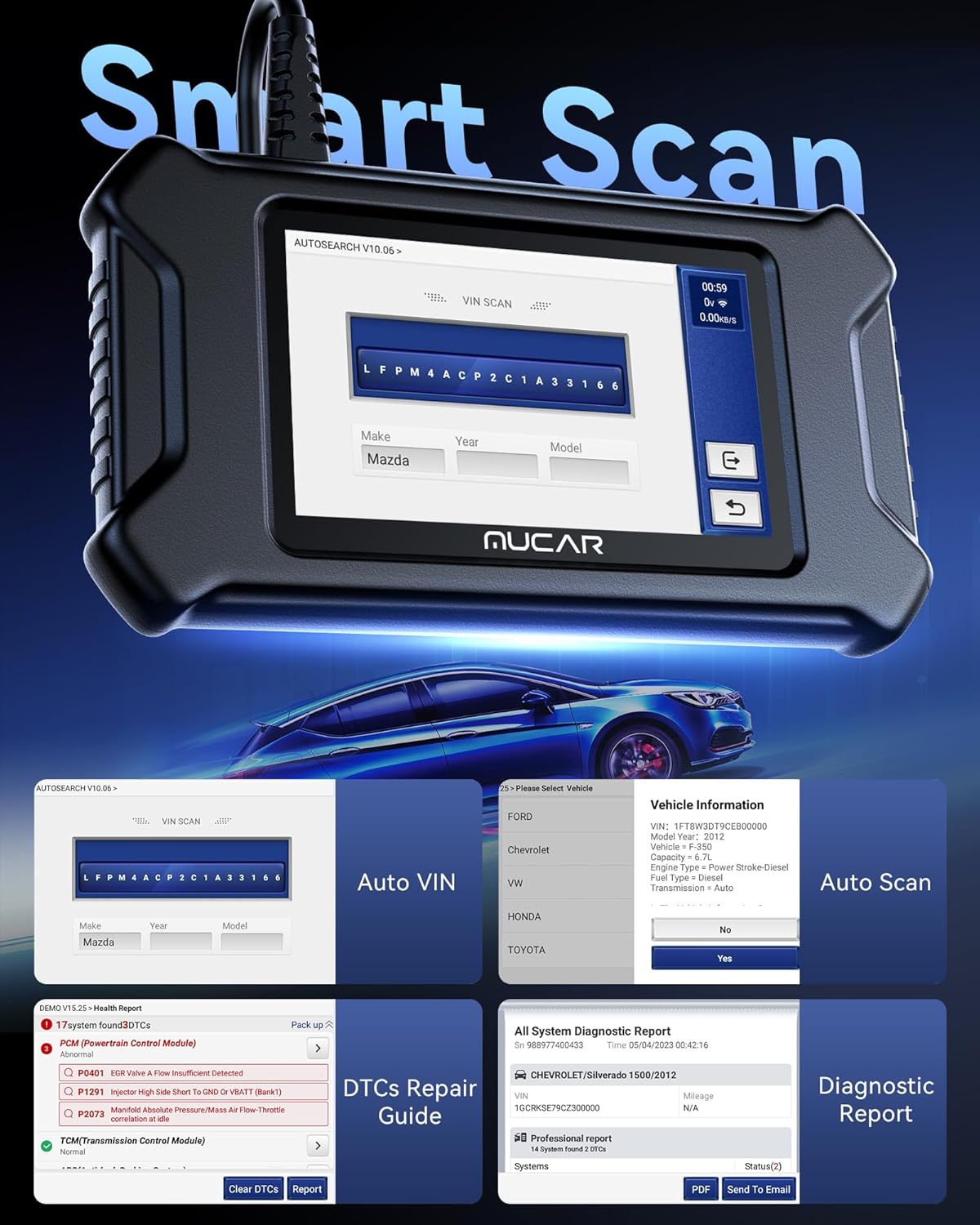
Upgraded OBD2 Scanner with 4 System Diagnostics: This CS90 scanner can automatically identify your car information with auto vin, delivering a quick detection of engine, transmission, ABS and SRS system, reading and explaining trouble codes in seconds with repair guide. Get code definitions, possible causes, check live data stream, and generate reported corrections. Warm tips: Not all cars support Auto VIN, you can manually select the vehicle model through the list. And If a fault code returns after clearing, it usually means the issue hasn’t been fully resolved.
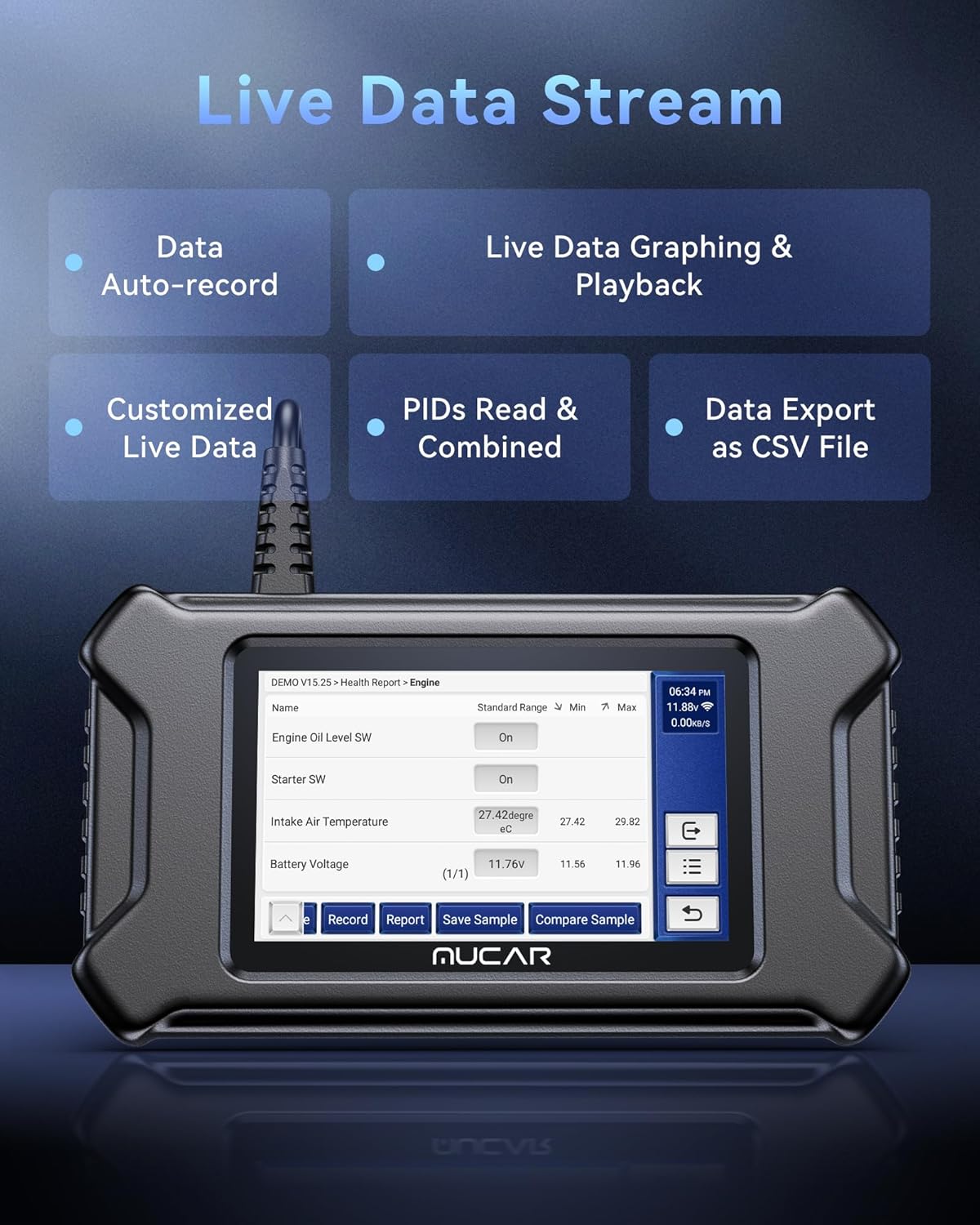
Smart and Effective Solutions: This car scanner allows combine and monitor multiple PIDs in real-time, playback, export as CSV files, and analyze the overall operating condition of the vehicle deeply. And now you can generate customized diagnostic reports with logos and customer details to meet specific demands. Moreover, please submit any malfunctions online through the icon FEEDBACK, you will receive speedy troubleshooting and remote assistance from our mechanics.
Enhanced OBD2 Functions: This car scanner can support all 10 OBD2 test modes. read/clear codes, MIL fault indicator light, live data, EVAP system test, on-board monitor test, view freeze frame, O2 sensor test, check vehicle info, I/M readiness, DTCs code look-up, perform oxygen sensor tests and carbon canister tests to ensure your vehicle is ready for all emission services. In addition, offline diagnosis is supported even though there’s no WiFi nearby.
Lifetime Upgrade + Get Fr ee Extension Cable* : No update restrictions and annual fees. You will get the latest features with ongoing expansion through regular updates. And we add OBD2 Extension Cable (about 60 cm/2 feet) as f.r.e.e gift, owners do not need to bend down or squat down to find the OBD wire socket. For customers who previously had older versions of this product, you can still obtain the latest software support via Wi-Fi for fr.ee. Any issues with this product, get in touch with our dedicated mechanics and technicians at service @ mucarco. com.

Gaspar Cardona –
Bregando
Muy bueno
Chuck C. –
For a DIY’er it works
With the cost of auto service these days, it pays to try some things yourself. I had a check engine light on and the Mucar OBD2 scanner was a tool that helped me save money. The scanner pointed out to me that the issue was an O2 sensor gone bad. The scanner is a handheld tool that plugs directly into the port on my truck. When I initially plugged the scanner in there were a lot of updates that needed to be downloaded. Once the downloads were completed, I allowed the scanner to auto detect my truck and it did really fast. I ran the diagnostics and the scanner provided me the error codes to determine the issue.The scanner actually has so many features that I most likely will not use. I’m not that tech savvy. Overall, the scanner work great for me and was a good addition to my toolbox. It was a little pricey but most likely will pay for itself with a couple more DIY fixes.
Robert Ragan –
Good Value
It works great good value
Liis –
indispensable money and time saver
The scanner diagnostic tool weighs 14.4 ounces. It has an attached cable with a O B D 2 connector and 46.625 inches of usable length. The connector has a removable cap to protect it. It comes with a detached USB A to C cable. Overall the unit is 8.5 x 4.75 x 0.875 inches. The screen is 5.5 x 3.3125 inches. The color display is 4.3125 x 2.9375 inches. There is a slot for a micro SD card. The scanner does not have a power button. It turns on automatically when using the O B D 2 or USB A to C cable. The scanner has 2 GB of ram and 32 GB of R O M . It comes with online support and lifetime free updating. The CPU is 1.3 GHz quad core. The scanner has a one year warranty. Contact information of a website and email address is included in the manual. The instruction manual includes multiple languages of English, French, Spanish, German, Russian, Italian, Portuguese, and Japanese.The scanners functions are diagnose, O B D, history, maintenance, file, consult, update and settings. According to the manual:>Diagnose is used to read and clear D TC (diagnostic trouble code) of the ECU (electronic control unit) memory and to display and read real time parameters and data of the vehicle ECU. >O B D is a diagnosis of all problems related to engine codes, read data stream, read ECU information, etc. >History includes diagnostic logging. >Maintenance supports the most common multiple maintenance and reset functions. >File is used to record and establish the files of the diagnosed vehicles. The files are created based on the vehicle vin and check time, including diagnostic related data such as diagnostic related data such as diagnostic reports, stream records, and screenshots. >Consult includes 4 modules, a fault code database, a table of vehicles able to be diagnosed, videos, and a learning course. >Update allows you to update the diagnostic software and App and set frequently used software. >Settings is for common system settings to modify and add information. The scanner is W i F i blue tooth capable. The network needs to be set before use, not during diagnosis if being used. My check engine light was on in a 2003 Silver ado. Note: I did not use the scanners W i F i or the following operations. To use the diagnostic tool the O B D 2 port needs to be found on the vehicle. On the 2003 Silver ado, the port is highly visible just below the dashboard on the left side on the drivers side. I plugged in and turned the key one click and the tool scanner came on. I chose Chevrolet and could let the scanner find the vehicle identification number or manually enter it. I let the scanner find it. It came up spot on. I had to answer some questions about the transmission and drive train. I ran a health report and it found 2 codes in the power train system of mass airflow sensor performance (P 0101) and heat oxygen sensor heater performance (P 0161). I cleared the codes, since it does not stop the truck from running and it is not a safety concern. The scanner functions well and is ridiculously simple to use, which is value added for the expense. This scanner tool is indispensable. If I had it last year, I would have saved over a thousand dollars to be able to read my own spark failure codes, which is value added for the expense. I could have changed the spark plugs and wires myself and not pay for parts I did not need. The repair shop, I will no longer go to, charged high dealership prices for parts and labor in addition to fraudulent behavior and continually lying. The service advisor told me all the spark plugs, wires, and coils needed replacing, when I found out later only 3 spark cylinder codes went off. When I got home they did not use the requested N G K brand wires I asked for and double checked 4 times they were. I knew because N G K wires are blue and the replacement wires I got were black! I went to get the correct wires on and the mechanic told me the coils were only recommended. The coil charge alone was 800$ more than half of the bill. Plus, all the coils don’t fail at the same time and don’t all need to be replaced at once. I will use this tool to reset oil change lights and prior to getting my vehicles towed and repaired in case I can repair it myself and so I know what is actually going on with the vehicle, because finding a fair reliable trustworthy repair shop is nearly impossible.The only way this scanner could be better is if it had a hard carrying case along with a protector for the screen.
JuGGerNoTT –
handy car gizmo
i always panic when the check engine light comes on my old beater. this little diagnostic thingy is super easy to use n saves me a trip to the mechanic just to be told my gas cap is loose. screen is clear and cycles through menus pretty fast without lag. feels decently durable for a plastic scan tool, just dont drop it on concrete. definitely worth the peace of mind to know if my car is actually gonna explode or not.
Red –
Affordable and feature rich
The MUCAR CS90 is a capable mid‑range diagnostic scanner that delivers full OBD‑II support plus a suite of 28+ maintenance/reset functions — from oil/light resets, TPMS, SAS (steering‑angle) reset, battery service, to DPF, injector coding and more.It also offers useful conveniences for DIYers or small‑shop users: it reads and clears engine error codes, shows live real‑time sensor data (with graphing and playback of recorded data streams), supports AutoVIN detection for quick vehicle identification, and gets lifetime software updates without a subscription fee.For owners of older or common vehicles — or anyone needing a “step‑up” tool beyond a basic code‑reader — CS90 gives a nice balance of diagnostics and maintenance functionality at a relatively affordable price.On the downside, several users and reviews indicate limitations in scope and consistency. For example, although the CS90 advertises many reset and maintenance functions, some users report it only reliably handles engine diagnostics — other systems such as ABS, SRS or advanced module functions may not always work depending on the vehicle make/model.There are also occasional comments about durability or build‑quality issues, and some reviewers find the interface or function coverage less intuitive than higher‑end (dealer‑level) tools.the CS90 is a smart, budget‑minded tool that delivers useful “full‑system/maintenance‑capable” diagnostics — but if you need deep, manufacturer‑specific coverage or advanced module programming, it may not suffice.
R. D. Json –
Really useful.
This is 500 times nicer and more useful than the fixd plugin we had first. That one requires an app and you have to pay for the plugin and then also pay for the app that it connects to if you actually want to use it. This one is the real deal. More expensive, yes, but you buy it once and then you own it. It’s pretty much plug and play and I don’t know much about cars but I was able to use this to figure out what was going on with my older VW Touareg. Glad to have it as it saved me having to go in immediately on a small problem that could wait a little longer.
NJ –
Anyone who owns a car should always have one of these gadgets readily available. Sometimes you get a check engine light and it’s something minor like a gas cap that’s loose but without a tool like this you’d never know. Unfortunately not all people are honest so when taking your car to a mechanic not knowing what the CEL code is for you’re basically at the mercy of that mechanic. But if you had an ODB reader like this you wouldn’t have to guess what the issue is.This ODB reader is quite unique because it boasts plenty of features but unfortunately isn’t the most user friendly. I think it’s mainly the broken English in its menus. Also it does require wifi to connection for updates (which isn’t unusual) but it’s super slow and clunky. However once the initial setup is complete it is pretty darn good.This unit doesn’t only ready CEL codes but also does transmission codes, ABS codes and airbag faults as well. I’m sure it does more but I didn’t go through the entire menu. For me what’s important is live data logging and how accurate that information is and how quickly it is relayed to the unit. Thankfully this scanner tool does read live data and transmits that instantaneously. You’re also able to data log multiple items at once and view them in numerical or graph style. There is also a save function that you do not see in all ODB scanners so that’s a nice touch.The build quality is actually pretty decent. The screen is nice and bright. Touch sensitivity seems pretty good too. The cable is long enough to work in comfort. Overall nothing to complain about really. This is a great unit for what it is. It all depends on what you’re looking for in an ODB scanner. If you just want to read CEL codes and erase them then any run-of-the-mill scan tool will do that. However if you’re wanting to take a deep dive and actually diagnose whatever issue or problem you’re having with your vehicle then this is an awesome tool for that.One thing to note in the initial setup, you do not need to download all the updates for all vehicle makes. There are plenty of brands that I’ve never heard of or are region specific so I unselected those ones to speed up the downloading process. The super slow download speeds was the only hiccup this unit has. Thankfully you only do it once and you’re done. Otherwise a solid ODB diagnostic tool.
Sinnik –
So I’m just a regular joe, and by no means a professional mechanic, but I do like to at least try and fix issues with my vehicles, before having to take them to a auto repair shop where they can charge me an arm and a leg. This OBD2 scanner device is perfect for that, and can help save thousands of dollars in the long run by diagnosing issues, so that you can fix the issue yourself. I had this scan my older GM car, and it detected 3 issues, that I was able to quickly and very affordably fix myself by watching some YouTube videos.The build quality of this scanner is excellent and feels pretty good in the hand. It is made of decently rugged materials, and also is easy to clean as well. My only negative note is that the screen looks fairly small by todays standards, and the bezels are fairly large. This doesn’t take away from functionality in anyway, but a bigger screen would be a nice upgrade. The battery is plenty large, and I found that I had it on almost the entire day without needing to recharge it. This truly feels like a very quality made scanner at a fraction of the cost of many others, and I was just as impressed with the actual operation of it.It gets connected to the vehicle via the OBD2 port/cable – this is not a wireless device. A lot of the information that gets fed into it however, is done through the internet. So WIFI connection is very much recommended, so that you can receive the most up-to-date information on your vehicle. When I first connected to the WIFI, it spent a good 10 minutes updating its firmware and most of my selected brands of vehicles information. When you choose to download a certain brands’ up-to-date vehicle information, this does eat into the overall storage of the scanner, but the internal 32GB of storage on the scanner is large enough to fit them all. I found the scanner usage very straight forward and intuitive, so you honestly don’t have to be a professional mechanic to be able to use this, although some vehicle knowhow is recommended. The free lifetime updates of the tool and vehicle information is a very nice addition that should be taken into account as well.Overall, I’m very happy with this OBD2 Scanner – its way more capable than those other cheap OBD2 scanners that most people have come to be used to. Being able to diagnose and fix some issues myself will save me way more money in the long run, than the cost of this scanner – for this reason, this is an easy recommendation.
PK@CA –
I’ve had the chance to test a few scanners from this company, and this one is probably the most stripped-down in terms of size and features. The plastics are quite basic. They feel fine in the hand, but they definitely don’t give the impression of a premium product. The construction is simple, and I don’t think it would withstand much rough handling.The screen is a good size and easy to read and navigate. I did have a bit of a chuckle when trying to set the time zone — I couldn’t find any Canadian zones, but there were options like “St. John’s-America” and “Regina-America,” which was amusing. I had to make do with New York.There were only a couple of things that needed updating, and some updates appeared to happen automatically. Based on previous experience with these types of scanners, I assumed that anything requiring updates would be handled once the unit was connected to the car.Compared to some of the other units I’ve tested, this one’s layout is easier to navigate and doesn’t feel as sluggish. Unlike some previous models I’ve tried, this is essentially an Android tablet running scanner software. Still, it doesn’t have a battery and only works when plugged into the car or connected to a USB-C power source.The advertisement mentions a two-foot extension cable, but my unit didn’t include one. The attached cable works fine, but it limits how far you can position the scanner — roughly within a foot and a half to two feet of the vehicle’s port. There isn’t much flexibility there. It would also have been nice if the screen had a protective overlay to help keep it clean.Navigation was fairly easy, though the unit took a little longer than expected to identify the vehicle. Running the auto diagnosis pulled up a couple of error codes, including a recent parking brake issue. The scanner provides enough information to serve as a starting point for further online research.One limitation I noticed is that it only allows two live graphing views at a time, which feels somewhat restrictive. Another odd design choice is that there isn’t an option to properly exit or shut down the unit before unplugging it.Exporting information, generating PDFs, and taking screenshots or videos is quite easy. However, the floating control buttons take up valuable screen space and can block the information you’re trying to see, so you move them around fairly often.Overall, I like the functionality and the compact form factor. That said, I would have preferred a removable cable for easier storage since the fixed cable sticks out from the back quite a bit.In the end, the live graphing options were somewhat limited, and the number of system diagnostics was somewhat restricted. When compared to an VAG-COM Volkswagen scanner, this one falls well short. It may be more useful with other vehicle brands, but for my Volkswagen, it felt fairly limited.It’s a good tool overall, but not necessarily the best value available for VW’s.
LastChance Reviews –
I pulled this OBD2 scanner tablet out of the box expecting a specialized diagnostic tool with a locked-down interface. Instead, I got what amounts to a full Android tablet that happens to run diagnostic software.My son proved this point immediately. I set it down for two minutes to grab a cable, and he had YouTube running on it. That’s when I realized what we were actually dealing with: a genuine Android device with OBD2 software installed, not a proprietary black box.The range of car makes it supports is genuinely impressive. We ran it through diagnostics on three different vehicles in our driveway, and it recognized all of them without hesitation. The compatibility list spans continents, which matters if you’re someone who works on different brands or plans to keep this tool for years.What sold me on this scanner for the home mechanic is the email reporting feature. Run a full diagnostic, and it compiles everything into a report you can send to yourself or a professional for a second opinion. No squinting at small screen text trying to write down codes.The lifetime free updates seals it. You’re not buying a tool that becomes obsolete in three years when new vehicle systems roll out. It grows with the industry.Verdict:Versatile, powerful OBD2 tablet that doubles as an Android device. Essential for home mechanics who want real diagnostic depth without dealer prices.
Dinu –
I recently got my hands on the MUCAR CS90 OBD2 Scanner, and honestly, it’s been great for how I handle car diagnostics at home. Right out of the box, setup was simple—just plug it into the OBD2 port, and it powers on automatically. The first-time update over WiFi took a bit of patience, but once that was done, the scanner was ready to roll. The lifetime free updates are a huge plus, meaning I won’t have to worry about it getting outdated anytime soon.What really stands out is how much this little 5-inch device can do. It handles engine, transmission, ABS, and SRS codes quickly, and the live data monitoring is super responsive. I was able to track multiple parameters at once, view them in graph or numerical form, and even save or export the data for later. The interface is intuitive, so even though I’m not a professional mechanic, I can navigate the menus and understand what the codes mean without needing to Google everything.The 28+ reset services are where this tool really shines. Oil resets, EPB, SAS, battery matching, throttle relearn, ABS bleeding, injector coding—you name it, it can handle it. I’ve already reset service lights, recalibrated sensors, and even cleared stubborn error codes on an old Toyota Corolla. Having these features alone has saved me from multiple trips to the mechanic and a lot of unnecessary expenses.Physically, it’s compact and lightweight, though the 5-inch screen can feel a bit cramped when monitoring lots of live data at once. The build is decent but plain plastic, and the OBD cable is permanently attached—which is convenient for most uses but something to be careful about. Still, it feels solid enough for regular DIY work, and the screen is bright with good touch responsiveness.I also love the Auto VIN feature, which instantly recognizes the vehicle so you don’t have to punch in details manually. For FCA vehicles, the AutoAuth function is fantastic—it just connects without any hassle. Plus, the included OBD2 extension cable makes it easier to reach those awkward ports without bending over uncomfortably.Overall, the MUCAR CS90 is more than just a code reader—it’s a full diagnostic toolkit in a compact form. It’s perfect for DIY enthusiasts who want to understand their cars better, handle maintenance themselves, and save money on repair bills. Sure, it’s a little small and the build isn’t rugged like high-end pro tools, but the functionality and lifetime updates make it totally worth it.