

Now You Can Rescue Many Of Your Messed Up Photos
with Photoshop Elements 8, 9, & 10
Clear And Concise Instructions On How To Use Photoshop Elements
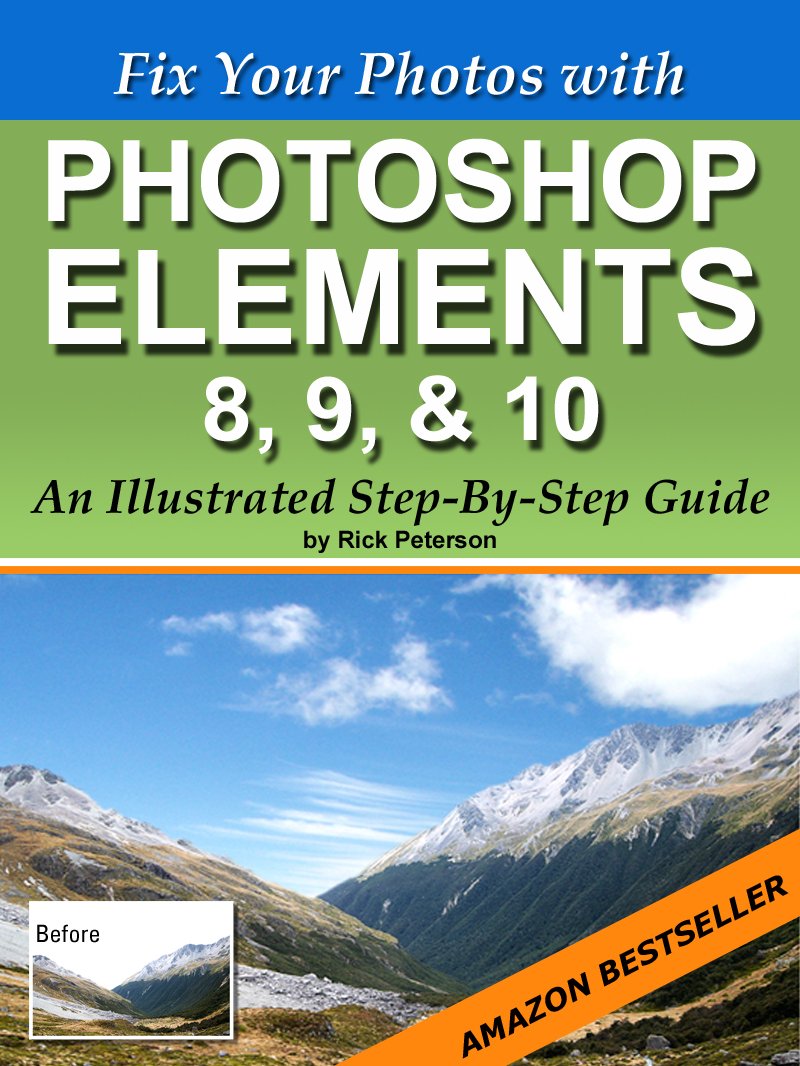
Photoshop Elements is the best-selling consumer photo-editing program. As we all take more and more digital photos it’s the clear choice to fix our less than perfect photographs. But, Elements can be a bit overwhelming at first.
In this fully illustrated step-by-step guide you’ll learn how to fix some of the most common photography problems. You’ll see exactly where to go and what to do to fix specific problems.
You’ll be amazed at how easy and quick it is to fix your photos once you know how to use the power of Elements.
You’ll learn…How to fix underexposed photos
How to replace a dull sky
How to sharpen photos
How to add contrast to your photos
How to remove a color cast
How to straighten crooked photos
How to remove red eye
How to adjust skin tones
How to fix overexposed photos
How to fix white eyes in pets
How to straighten leaning buildings
How to lighten up dark areas
How to create a blue sky
You’re going to love how quick and easy it is to fix your photos with this handy little guide showing you every step of the way.
Start fixing those photos you thought were no good by scrolling up to the top of the page and click the orange Buy button now!
Please be kind and leave a review after reading if you have time. Thank you!
ASIN : B009R8PZC4
Accessibility : Learn more
Publication date : October 14, 2012
Language : English
File size : 3.1 MB
Screen Reader : Supported
Enhanced typesetting : Enabled
X-Ray : Enabled
Word Wise : Not Enabled
Print length : 70 pages
Page Flip : Enabled
Best Sellers Rank: #2,669,073 in Kindle Store (See Top 100 in Kindle Store) #511 in Adobe Photoshop #955 in Design & Graphics Software Books #1,244 in Photography Reference (Kindle Store)
Customer Reviews: 4.5 4.5 out of 5 stars (115) var dpAcrHasRegisteredArcLinkClickAction; P.when(‘A’, ‘ready’).execute(function(A) { if (dpAcrHasRegisteredArcLinkClickAction !== true) { dpAcrHasRegisteredArcLinkClickAction = true; A.declarative( ‘acrLink-click-metrics’, ‘click’, { “allowLinkDefault”: true }, function (event) { if (window.ue) { ue.count(“acrLinkClickCount”, (ue.count(“acrLinkClickCount”) || 0) + 1); } } ); } }); P.when(‘A’, ‘cf’).execute(function(A) { A.declarative(‘acrStarsLink-click-metrics’, ‘click’, { “allowLinkDefault” : true }, function(event){ if(window.ue) { ue.count(“acrStarsLinkWithPopoverClickCount”, (ue.count(“acrStarsLinkWithPopoverClickCount”) || 0) + 1); } }); });
 Photoshop Elements 2026 Handbook: An Illustrative User Guide for Mastering Photo Editing and Photo Retouching for Photographers and Designers eBaydiy Tools
$37.97
Photoshop Elements 2026 Handbook: An Illustrative User Guide for Mastering Photo Editing and Photo Retouching for Photographers and Designers eBaydiy Tools
$37.97
 Pen & Wash Photo Conversion Adobe Photoshop: All Adobe Photoshop Versions (Adobe Photoshop Made Easy Book 260) eBaydiy Tools
$0.99
Pen & Wash Photo Conversion Adobe Photoshop: All Adobe Photoshop Versions (Adobe Photoshop Made Easy Book 260) eBaydiy Tools
$0.99
Fix Your Photos with Photoshop Elements 8, 9, & 10 – An Illustrated Step-By-Step Guide eBaydiy Tools
$49.99
🚚 Free Shipping on orders over $75+
📦 Arrives: Apr 03 - Apr 05
🛡️ 2-Year Professional Warranty Included
Guaranteed Safe & Secure Checkout



Shooter Boone –
A Teachers…Teacher.
I found Rick Peterson by accident. It was the best accident anyone could have! I watched Rick’s videos and was very, very impressed with him. He is truly a GREAT COMMUNACATOR. Some instructors either talk to fast, or they make quick moves in their demonstrations. Rick dose neither of these. He speaks in a manner that is soothing and tells you what he is about to do before he makes a move. This is very good in that you feel relaxed, with no stress levels. Rick is by far the best I have ever seen at teaching Photoshop Elements. I read this book, and will continue to read it many times again as I feel the need. This book, like all his teachings, is concise and to the point. I would almost say it is like reading in shorthand with an outstanding retention factor for the brain. I would buy this book again, and highly recommend this man’s teaching methods to anyone who wants to learn Photoshop Elements the right way…..and that is being relaxed, not all tensed up. Thanks Rick!!! Very Sincerely, Bill.
D. Elliott –
Crisp, clear and helpful
Like his videos, Rick Peterson’s new book clears up much of the confusion that stems from the complexity and richness of Photoshop Elements. Sure, there’s a manual that explains the features, but what we need is something that starts with the task at hand: “If I want to accomplish X, what steps do I follow?” Rick’s book fills the bill nicely.The book tackles 13 things you might want to do to fix up less-than-stellar photos, from sharpening blurry images to correcting under- and over-exposure to fixing up anemic skin tones. He explains each procedure in clear language, step by step, with great examples and with screen grabs from the PSE interface so there is no doubt how to accomplish your task.”Fix Your Photos with Photoshop Elements …” has already become a standard reference for me. Thanks, Rick!
twclead –
Mixed feelings
I welcome the increased performance and enhanced tools of this latest version of PSE. And it is a great bargain. Selections are much easier, the revised raw editor standardized lots of adjustments making them easier to be consistent.I do not however, like the “dumbing down” of the interface. When editing an image I want all the real estate I can get, and the tool options at the bottom were not a welcome change. Also do not like or understand the reasoning behind the changes to the adjustment panels. Between these two changes, I find myself chasing the cursor all over the screen with more clicks required for editing.Still, I cannot remove the fact that PSE11 is a superb program that allows the less affluent to have editing tools that will do the job without the huge cost of CS6. Thank you for that.
Novice –
easy steps real projects
Rick Peterson’s understanding of all things pertaining to fixing and fashioning photographs using Photoshop Elements 8,9 & 10 is such a breath of fresh air. For someone like me who finds it hard to learn new concepts and techniques simply by reading, his step by step approach of doing tasks as you read is wonderful. I know there are other books that do that but none of the ones I have seen describe the workings of the various tools and tricks that can be done with them quite a simply as Rick does it. Of course I am no expert but I guess that is what makes me an expert on being a duffer! Something about the various tasks undertaken just have such a catch to them that you can’t help but have things stick in the memory bank for recall when required. Going back and forth in a book is so much better when trying to grasp a new concept than trying to find your place in a video. Old fashioned – maybe but it works for me.I would hope that he continues where he has left off and makes the effort to publish further task related lessons; ones with ever increasing depth for building on the solid foundation that he has built into me as I have worked through the examples in Fix Your Photos with Photoshop Elements 8, 9, & 10 – An Illustrated Step-By-Step Guide. Well done Rick
BS –
handy for common use
I think this is great. Gives you easy step by step for the most common tips that I wanted to know but too short on time to actually figure out! It is NOT an everything for dummies guide but gives me the easy fixes to the stuff I always wanted to do. I have suscribed to other newsletters and tip sites that I paid monthly fees for and spent hours online w forums and never received the easy concise help given here. If you can’t find it. . . ask Rick! Spend the money. . . he should be charging more!
Buzz Wagner –
Rick’s the best
Rick knows how to explain Photoshop Elements to DUMMIES! And you can take that from the chief Dummy. When he says to open a layer, he shows you EXACTLY which button, icon or slider to use. And he not only discusses what it does, he SHOWS you what it does and gives you hints on its limits.I had a copy of Photoshop Elements 9 that came with my computer but I tried it and found out it’s just not intuitive … or I’m not … so it just sat there on my desktop unused. I needed someone like Rick to take me by the hand and lead the way, step-by-step. I’ve found that it’s just amazing what you can do when you know how. Thanks, Rick.
N Teague –
Fix Your Photos with Photoshp Elements 8,9, & 10 – An Illustrated Step-By-Step Guide
Being fairly new to figuring out Photoshop Elements 8 and at times finding it confusing and overwhelming I am so thankful for this easy to read and understand guide by Rick Peterson. His photo examples, Photoshop Elements screen shots, and how-to-do steps are to the point. His website, […], is an additional huge resource. Thank you Rick – you have made this facet of my life a little more simpler! I hope you do more of these Elements guides as there are more features and techniques I’d like to master.
Amazon Customer –
Great only wish there were more instruction than the ones cover.
Great book, except somehow I got talked into upgrading to photoshop 11 and now feel I have to start over.
L –
What I like best about this book is that it is short, simple, easy to decipher with straight to the point advice and those helpful pictures at every event.There are copious quantites of other books about the Photoshop monster, however to get to what you want, you have to consult the chapter index and jump back and forth.Not so with Rick’s work. For recent versions of Photoshop Elements users this is a must read. He purposely kept Elements 11 separate. (Can be found in different book.)Rick has a delve of subscribers to whom he regularly sends tips and help stuff. Prior to going to print he wisely requested his subscribers thoughts on what to have in and out of his book. This is the result.A must have for the price.
Susanne D. –
DER Intensiv-Kurs für Beginner in PS Elements! Habe schon diverse Bücher in Deutsch darüber gelesen, aber dies ist die “einfachste” Lektüre für Menschen, die sofort mit dem Programm loslegen möchten! Kaufen… 😉
Douglas Martin Hawes –
Easy to follow. Ideal for beginers I have followed Rick for some time now and find he is a good ‘teacher’
Hughesie –
Rick Peterson has produced a really good manual; giving some clear, understandable tips and well explained advice on 13 basic functions of Photoshop Elements. If you want a manual that explains everything that Elements can do, I’m sure you’d want a far lengthier and expensive book. However, if you, like me, are a beginner in the early stages of manipulating your photos, then this is just the job.Everthing is clearly explained and simple to follow for anyone regardless of your level of competence or experience.Thankyou Rick, my photos are already looking better.
Flying Scotsman –
Recommended for anyone a bit mystified about how to get to grips with Elements. The author has thought through what needs to be learned, illustrated well, and provided a guide that is well worth buying at the price shown. Even more value for first purchasers at the introductory price! Well done for producing such a readable guide!